Your Personal
AI Asset Vault.
PromptHub brings Prompts, Skills, Rules, MCPs, Plugins, and Agent configurations into a unified workspace for organizing, versioning, syncing, and distributing your AI assets.
From Prompts to a Complete Agent Workflow
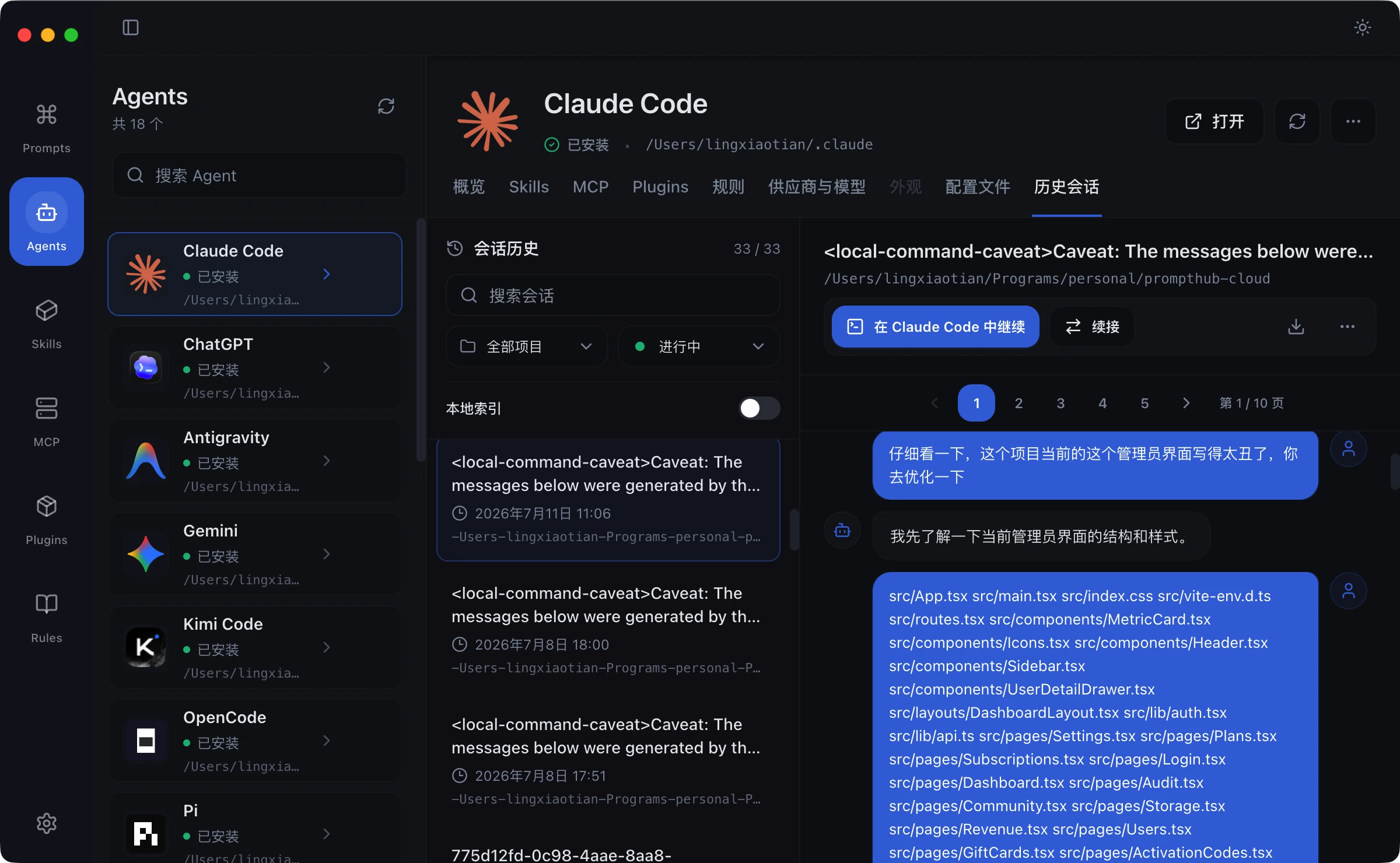
See PromptHub through real work surfaces: Agent management, sessions, prompts, skills, MCP, plugins, and rules in one extensible workspace.
Agent Workspace
Manage Agents and sessions together
See Agent status, project context, and session history in one workspace so you can return to active work quickly.
Bring Every AI Asset Into One Workspace
Organize, search, version, and distribute everything from prompts and skills to rules, MCP servers, plugins, and Agent configuration.
Local-First Ownership
Prompts, skills, rules, MCP entries, and Agent configuration stay in your local workspace by default, ready to use offline.
Agent Asset Management
Keep skills, rules, tool connections, plugins, and model configuration in the context of the Agent that uses them.
Multi-Tool Distribution
Install or distribute reusable AI assets to Claude Code, Codex, Cursor, Windsurf, and other mainstream Agent tools.
Providers & Models
Maintain model providers and compatible endpoints in one place, then choose the right setup for each project or Agent.
Version History
Track Prompt, Skill, and rule changes like code. Inspect diffs and restore a stable version when needed.
Sync & Backup
Move your AI assets between devices with backups, WebDAV, or cloud capabilities without locking them to one machine.
Global Search
Search titles, tags, content, and asset types to find a prompt, rule, or Agent configuration in seconds.
Local Scan & Discovery
Scan local Agent directories to discover existing skills, rules, and configuration files before importing them.
Open Export
Export structured data and workspace content so your AI assets remain portable across tools and platforms.
Turn AI Assets Into Reusable Workflows
Collect & Discover
Collect prompts, skills, rules, MCP entries, and Agent configuration from local folders, the community, and daily work.
Organize & Iterate
Structure assets by project and Agent, then improve them with version history, model tests, and clear metadata.
Apply & Distribute
Install verified assets into the target Agent and back up, sync, or distribute them across tools when needed.
Why keep your AI assets in your own vault?
Your Agent configuration, skills, and working methods keep growing. PromptHub keeps them in a local workspace you control, while making secure migration and sync available when you need it.
Clear Ownership
Your working methods, rules, and configuration are long-term assets that remain in your own device and workspace by default.
Reuse Across Tools
Organize a capability once and distribute it to different Agents instead of maintaining a separate copy for every tool.
Controlled Sync
You choose what to back up, sync, or publish. Cloud capabilities do not change the local-first default.
Common Questions
Community
Discover, share, and reuse prompts, skills, rules, MCP entries, and other AI assets while helping more Agent workflows work better.
Backers Arena
Heartfelt thanks to those who support the development of PromptHub.
*🌊
2026-01-08
"Support excellent software!"
*昊
2025-12-29
"Thanks for your software! Limited capacity, small support."
Become a Backer
Support Open Source